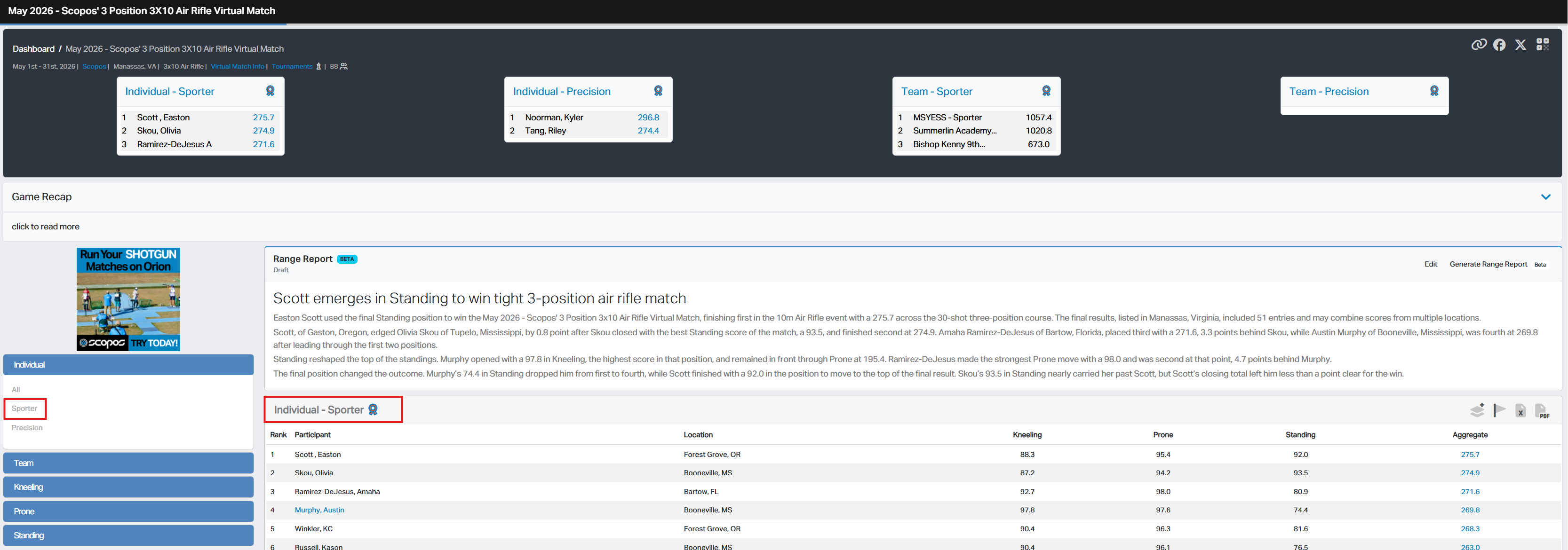
Range Reporter is a Beta feature on Rezults that uses AI to create a written summary of a competition's results. The summary, called a Range Report, can highlight leading performances, close finishes, and other notable details for athletes, families, and spectators.
Range Reporter does not change scores or rankings. It creates a narrative from the selected Result List and any additional context supplied by authorized match staff.
NOTE: Range Reporter is an AI-assisted feature. Always review the names, scores, rankings, and other facts in a Range Report before publishing it.
Range Reports and Result Lists
A Range Report belongs to one Result List. If a match has more than one Result List, each list may have its own Range Report.
When you select a different Result List on the Match page, Rezults loads the Range Report for that list.
Range Reporter is currently only available for Primary Result Lists. These are the Result Lists displayed in boxes at the top of a Match page.
Who Can Use Range Reporter
Published Range Reports are visible to anyone who can view the corresponding Result List.
Creating, editing, and publishing a Range Report requires:
•A Scopos Account signed in to Rezults.
•Access to the Match page on Rezults.
•The appropriate Range Reporter permissions for the match.
•Generation tokens when creating AI-generated content.
The controls shown on the Range Report card depend on your permissions:
•Generate Range Report is shown to users who may create a report.
•Edit is shown to users who may edit an existing report.
•Draft or Published is shown to authorized editors and identifies the report's current visibility.
If you are responsible for the match but do not see the expected controls, contact the match or club administrator responsible for your access.
The Range Reporter Workflow
1.Open the match on Rezults and select the desired Result List.
2.Generate a Range Report, optionally providing additional context.
3.Wait while Rezults creates the report.
4.Review and edit the report for accuracy.
5.Publish the report when it is ready for athletes and spectators.
It is a best practice to review every Range Report before making it public. AI-generated text may need corrections or additional details that are known only to match staff.
Draft and Published Reports
A Draft report is visible only to users with permission to edit it. Use Draft status while reviewing or revising a report.
A Published report is visible to everyone who can view that Result List, subject to the match's existing access and privacy settings.
Publishing one Range Report does not publish reports for the match's other Result Lists.
Beta Feature
Range Reporter is marked Beta because its behavior and availability may change as Scopos continues to improve it. Review the generated report carefully and use the editing tools to make any needed corrections before publication.
Topics in this Section